
Conoscere gli storage esterni collegati al device nelle Universal App
Grazie alla classe DeviceInformation, di Windows.Devices.Enumeration, possiamo conoscere i dispositivi collegati al device su cui è in esecuzione la nostra app. La classe espone il metodo FindAllAsync che accetta come parametro una stringa che rappresenta il tipo di device da cercare.
Nella fattispecie, se vogliamo conoscere le informazioni sugli storage portatili collegati possiamo usare il metodo GetDeviceSelector di Windows.Devices.Portable.StorageDevice, come nell'esempio.
var str = new StringBuilder();
var devices = await DeviceInformation.FindAllAsync(Windows.Devices.Portable.StorageDevice.GetDeviceSelector());

foreach (var device in devices)
{
  str.AppendFormat("Id {0}{1}", device.Id, Environment.NewLine);
  str.AppendFormat("Name {0}{1}", device.Name, Environment.NewLine);
  str.AppendFormat("IsDefault {0}{1}", device.IsDefault, Environment.NewLine);
  str.AppendFormat("IsEnabled {0}{1}", device.IsEnabled, Environment.NewLine);

  if (device.EnclosureLocation != null)
    str.AppendFormat("{0}{1}", device.EnclosureLocation.Panel, Environment.NewLine);

  foreach (var prop in device.Properties)
  {
    str.AppendFormat("    Propertiey Key {0} Value {1} {2}", prop.Key, prop.Value, Environment.NewLine);
  }

  var thumb = await device.GetThumbnailAsync();
  var bmpi = new BitmapImage();
  await bmpi.SetSourceAsync(thumb);
  img1.Source = bmpi;
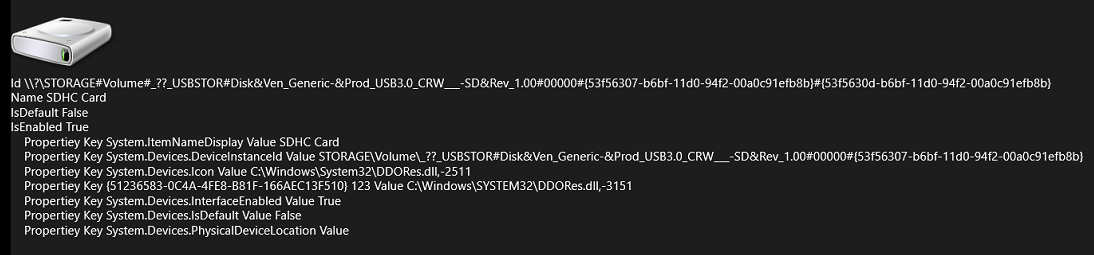
Dello storage collegato possiamo avere molte informazioni tra cui anche la thumbnail che gli assegna il sistema operativo.


Commenti
Accedi per commentare
Per partecipare alla conversazione, accedi o crea un account gratuito.